Review Comments (0) Screenshots (5) Questions & Answers (0) Votes (0) Awards (6) Wiki  
Zealotsoft,Inc.
1.8
This link has been deleted, because the target site may harm your computer.
Shareware
$29.00
98 people
Download All Video to MP4...

7.13 MBDownloaded 958 times

 
Video tutorial for All Video to MP4 Converter 1.8
Frame
Video tutorial for All Video to MP4 Converter 1.7
Frame
This video tutorial has been acquired from Downloadtube.com
McAfee SiteAdvisor warning
McAfee SiteAdvisor web reputation analysis found potential suspicious behavior on the developer's website, which may pose a security risk. Proceed with caution. Click here to see McAfee SiteAdvisor report.

Review

This is official description

All Video to MP4 Converter is a powerful and easy to use MP4 converter Software which helps you convert AVI to MP4, MPEG to MP4, WMV to MP4, MP4 to MP3 easily and fast with simple settings.It can convert almost all video formats, e.g. DivX, XviD, AVI, WMV, MPG, MPEG, MP4, M4V, FLV, 3GP, ASF, RM, RMVB, MOV, MOD, ASX, MKV, OGM, SVCD, VCD, VOB Video formats and so many portable media player (MP4 players) such as WideScreen iPhone, iPod, Archos AV500, Archos AV700, Archos Gmini402, iRiver PMP-100, Creative Zen Vision etc. The MP4 Converter gives you everything you need to turn your MP4 Player into a portable media center, enjoy your favorite movie on your iPod, Apple TV, Sony PSP, PS3, Zune, Xbox 360, Acrchos, Pocket PC, PDA, Palm, etc. as a MPEG4 Player using the MP4 Converter.
 
The following review written by one of the Software Informer contributors applies to version 1.7

MP4 stands for MPEG-4 Part 14, which is a media container video file format that is extended from QuickTime format and developed by ISO. By converting your videos to the MP4 video format, you will be saving disk space and making your video compatible with many portable devices.

All Video to MP4 Converter is able to convert many video formats such as AVI, WMV(Windows Media Video), MPEG, FLV(Flash Video), PSP, 3GP, RMVB( Real Video), SWF( Adobe Flash), and Quick Time, to MP4 video format.

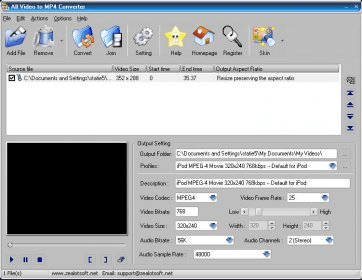
You can browse and add multiple files at once and after adding them, you will be able to view the video information such as its size and output aspect ratio. The program offers the ability to cut parts from a video by stating a new start and end time, and it has the ability to play the input video(s) from within the program's main window.

Output settings can be applied to the resulting video, such as video codec, bitrate, dimensions and audio properties. The program also can join multiple videos into one single file. The program supports 11 nice skins that can be changed on the fly.
  • Low memory consumption.
  • Easy two-step conversion.
  • Trial version forces a trademark.

Reviewed by: Mark Adeeb

Reviewer rating:

Reviewed: 2 years ago

What's new in version 1.8

updates, bug fixes.
Report a wrong version Report a wrong program title Suggest a correction

Screenshots

Main window Main window Setup Wizard. Setup Wizard. Main Screen. Main Screen. Options. Options.
All 5 screenshots

Latest comments


There are no comments, be the first one!
Add new comment

E-mail Address:

Password:

Register now »

Forgot password?

Sign in with:
Download Software Informer Client
Copyright © 2012, Informer Technologies, Inc. About| Privacy and terms| Help| Feedback & Support| Partners program